

How to show current git branch in terminal on Mac
Mon Dec 09 2019
• • Tips
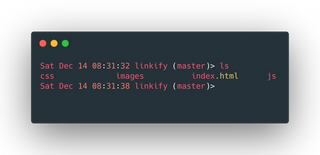
You can effortlessly show your current git branch in your terminal without having to run git branch every time. The terminal can easily be customized beyond just showing your current git branch but in this article, I would focus on only showing you how to display your current git branch.
TLDR
Copy and paste this code to the bottom of your ~/bash_profile file.
parse_git_branch() {
  git branch 2> /dev/null | sed -e '/^[^*]/d' -e 's/* \(.*\)/ (\1)/'
# git branch 2>/dev/null | /usr/bin/grep '^*' | colrm 1 2)"
}

PS1_date="\[\033[38;5;237m\]\d\[$(tput sgr0)\]\[\033[38;5;15m\]"
PS1_time="\[$(tput sgr0)\]\[\033[38;5;236m\]\t\[$(tput sgr0)\]\[\033[38;5;15m\]"
PS1_wdir="\[$(tput sgr0)\]\[\033[38;5;24m\]\W"
PS1_gitbranch="\e[38;5;204m\]\$(parse_git_branch)"
PS1_gt="\[$(tput bold)\]\[$(tput sgr0)\]\[\e[38;5;214m\]>"
PS1_other="\[$(tput sgr0)\]\[$(tput sgr0)\]\[\e[38;5;15m\]"

export PS1="${PS1_date} ${PS1_time} ${PS1_wdir}${PS1_gitbranch}${PS1_gt}${PS1_other} \[$(tput sgr0)\]"
That's it! Now open a new terminal tab to see the effect.
Customize the text, color, and appearance.
\ustands for your user name;\W– shows your current folder;- Each variable defined has a similar code that looks like this
[\033[01;33m\], this is the section you might want to play with.
The number before the semicolon;determines the styling/appearance of the text;00for normal,01for bold and04for underline.
The number after the semicolon;determines the color of the text;30mfor black,31mfor red,32mfor green, etc.
If you want to use other colors, check the codes below
\[\033[00;30m\] – Black
\[\033[00;31m\] – Red
\[\033[00;32m\] – Green
\[\033[00;33m\] – Yellow
\[\033[00;34m\] – Blue
\[\033[00;35m\] – Purple
\[\033[00;36m\] – Cyan
\[\033[00;37m\] – White

High intensity:
\[\033[00;90m\] – Black
\[\033[00;91m\] – Red
\[\033[00;92m\] – Green
\[\033[00;93m\] – Yellow
\[\033[00;94m\] – Blue
\[\033[00;95m\] – Purple
\[\033[00;96m\] – Cyan
\[\033[00;97m\] – White

Background:
\[\033[40m\] – Black
\[\033[41m\] – Red
\[\033[42m\] – Green
\[\033[43m\] – Yellow
\[\033[44m\] – Blue
\[\033[45m\] – Purple
\[\033[46m\] – Cyan
\[\033[47m\] – White

Backgrounds with high intensity:
\[\033[00;100m\] – Black
\[\033[00;101m\] – Red
\[\033[00;102m\] – Green
\[\033[00;103m\] – Yellow
\[\033[00;104m\] – Blue
\[\033[10;95m\] – Purple
\[\033[00;106m\] – Cyan
\[\033[00;107m\] – White


source - https://www.stijit.com/git/show-git-branch-colours-terminal-mac
Note that if you already have PS1 variable, then you’ll just need to modify it by adding this code to the end of PS1:
-\[\033[00;32m\]\$(parse_git_branch)\[\033[00m\] $